Content management workflow: 9 fixes that don't require a new CMS


TL;DR
Much of the pain in a content management workflow sits in the process around the CMS, in the handoffs, ownership, approvals, briefs and the way AI gets used, which is why a new platform rarely removes it. This article is for content managers running production across several contributors and tools, and it sets out nine fixes, each matched to a different break. Most of them need a decision and a calendar invite, nothing more.
It's 9:40 on a Monday, and you're looking for the live version of a draft. There are three candidates: one in the shared drive, one pasted into the CMS on Friday, and one attached to an email thread where a product manager left fourteen comments. The approval request you sent for it turns eleven days old today.
None of the tools involved has failed. The drive stored the file, the CMS accepted the paste, and the email arrived. Your content management workflow broke in the spaces between them: two people edited in parallel, nobody owned the review, and the brief left enough gaps that every reader filled them in differently.

That's why a new CMS tends to disappoint teams in this position: it replaces the part that was working. Some teams do need a new platform, and we'll cover how to tell. For many, the faster gains come from the process layer, the part a content manager can change this quarter. If you're building a pipeline from scratch, the seven steps to a robust content creation workflow set out the foundations; the nine fixes below repair one that's already running, and each targets a different break.
Why a content management workflow breaks
Contentoo's State of Content Teams 2026 report (The Rant Report) found that 90% of teams saw content demand increase in the past year, while less than half saw headcount or budget keep pace. Pedro Ferreira, VP of Marketing at Rydoo, framed the question many content leads now face: "With the same resources, plus AI, how do you keep increasing your return?"
At low volume, people fill the gaps in a process by hand. When the number of pieces in production doubles, filling those gaps takes up most of the week.
Most problems show up in one of three places: before the draft, when the context is thin and nobody owns each step; between people, as work passes from writer to editor to designer; and at sign-off, when reviews wait on someone without a deadline. The cause often sits a stage earlier than the symptom. A late publish turns out to be a review with no owner, and thin copy turns out to be a brief that left out the angle. Our piece on content workflow bottlenecks makes the same case: when the pipeline stalls, look first at the operating system around the work.

When the platform really is the problem
Sometimes the CMS is the source of friction. Three signals point that way: your CMS can't hold the review states you need, so approvals live in a spreadsheet beside it; every layout change or new landing page needs a developer; or you publish across several websites and markets and copy content between instances by hand. If two of those sound familiar, a platform review may be justified, and the six things to consider before choosing a content creation platform give you a sensible starting checklist. Fix the process at the same time, or the new system inherits the old habits.
9 content management workflow fixes you can start this quarter
The fixes below need no procurement sign-off. They target different breaks, so start with the one closest to your loudest symptom.
Fix 1: Map the workflow as it actually runs
Your official workflow has four steps. The real one has seven, plus a Slack channel where the important decisions happen. The Rant Report found that 65% of teams have a fully documented content workflow, yet 76% of those teams still regularly publish content they know isn't good enough. A document records how work should move, while the team decides how it moves under deadline, which is why our guide to content operations for beginners treats writing the process down as a starting point.
Map the real version. Take one piece published last month and trace it from request to live page with the people who touched it. Note every status change, every handoff and every place it waited, including the workarounds nobody wrote down. You'll often find sequential steps that could run in parallel, such as design starting while the edit is still open, and parallel steps that keep colliding.
With the true shape in front of you, choose the structure deliberately. A task-based workflow suits predictable formats like blog articles, and status-based workflows suit anything with review gates. Our content workflow checklist lists the stages to audit against, so the map covers every one.
Fix 2: Keep one live version of every draft and asset
Three versions of a draft in circulation and last year's logo in the final PDF usually share a cause: files land wherever suits the person holding them, so the latest version lives in several places and agrees with itself in none.
Pick one canonical home for drafts and make it the only place edits count. Once a draft enters your content management system, earlier copies become reference material, and nobody edits them again. A web content management workflow that publishes to multiple platforms needs that rule most, because every extra destination is another place for a stray copy to go live.
Apply the same rule to digital assets: one shared library for approved images, logos and copy blocks, a naming convention a newcomer could follow, and one person who clears out the duplicates each month. Digital asset management can start as a well-run folder. It needs an owner more than it needs software.
Fix 3: Name an owner for every stage
A draft has been "with the team" for a week, and nobody can say who has it. Ownership usually gets assigned to the finished piece, leaving the brief, the edit, the design pass, and the review unattended in between.
Name one person and one deadline for every stage, because a named colleague can be chased. When you assign tasks at the stage level, the tool you already use shows where each piece is stuck and who can move it, and project managers can drop the status meetings they hold to find out.
The owner can sit anywhere in the team. What matters is that responsibility is explicit, written into the workflow, and given time in someone's week, so a content team juggling several projects knows who owns each one.
Fix 4: Write briefs that carry the context
The brief arrived as one line and a link, and the writer has spent two days guessing. The cost shows up later, as slow drafts and heavy edits, which is why weak briefs stay invisible for so long. The Rant Report names poor or incomplete briefs as the top quality killer, cited by 56% of teams, and getting a clear brief ranks as the second-biggest bottleneck, at 41%.
Give the brief required fields, the ones our guide to creating great content briefs covers in depth: the target audience, the job the piece does, the angle, the brand guidelines that apply, the channel it will run on, and the primary keyword with its search intent. Putting keyword research into the brief lets SEO shape the structure from the first line, where a last-minute optimisation pass can only adjust phrasing. Keep the brief beside its entry in the content calendar, so the writer inherits the reasoning behind it.
Mehak Chowdhary, Head of Marketing at TestGorilla, put the stakes plainly in The Rant Report: "We always said content is king. But it turns out context is king – and content is just the intern." A better brief is one lever among nine, though. It won't rescue an ownerless review or a cluttered toolchain.
Fix 5: Give approvals a clock and a scope
The approval request is eleven days old, or three reviewers have each rewritten the others' changes. Review without a deadline or defined scope becomes a queue, and The Rant Report names internal review and approvals as the top-cited bottleneck in content production, at 45%. Simone Engbo Hansen, Content & Communications Lead at Airtame, described where that ends: "Someone had to sign off, then it had to go to the board, and the diluted version came through the manager three months later... That's where a content angel loses her wings."
Build a structured approval process with three parts: a decision window for each stage, a named approver, and a default agreed in advance for when the window closes. For routine content, the default can be that the piece proceeds. For legal or compliance review, the default should be escalation, because silence there carries real risk. Then scope each reviewer's authority: a subject-matter expert can block on factual accuracy and advise on everything else, and legal can block a claim without rewriting the introduction.

The objection is predictable: you can't put a deadline on your VP. Agree the window when the brief is signed off, as part of the team's working agreement, and the deadline becomes a commitment the reviewer made upfront. Tiering review depth by risk, as our guide to the content approval process sets out, keeps the queue short for low-risk pieces.
Fix 6: Cut the copy-paste between tools
Nearly as many teams in The Rant Report want better tools (46%) as better workflows and processes (48%), and only 7% name more budget as their top fix. Before adding a tool, look at what the existing ones do to a single piece. One article might touch six of them on its way to publish, and a comment from the legal review can disappear somewhere between the third and the fourth.
Map your content projects across your existing tools and ask a blunt question of each: does it hold work other people need, or does it only move work along? Then follow one piece and count every time someone retypes or pastes the same content.
Take that lost legal comment. Traced end to end, the piece moved like this: legal marked up a PDF export, the editor retyped the changes into the Google Doc, the final copy was pasted into the CMS, and the SEO lead copied the meta description into a tracking sheet. That's three re-entries, and the comment fell through the first. Two changes remove most of them: legal comments directly in the canonical draft from Fix 2, and the meta title and description become fields in the brief that travel with the draft into the CMS. Only then is it worth asking whether an integration should handle the last paste. Workflow automation earns its place when it deletes a copy-paste step; automating a broken handoff only hides it.

📌 Worth reading: If the audit shows a real gap in your content workflow software, our roundup of the top 9 content workflow software and tools for 2026 compares the options.
Fix 7: Decide what AI does and where judgement sits
The Rant Report found that 45% of teams reach for AI first when output falls short. Drafting gets faster, editing time grows to match, and the review stage absorbs everything the tool got wrong, because the workflow around the tool stayed the same.
The Rant Report suggests teams are learning where AI helps. Content briefs are now the top AI use case, at 46%, while only 21% use AI for drafting. Teams that fundamentally restructured their workflow around AI are also more confident in their content quality: roughly 51–54% say they are very confident, against about 34% of teams that went faster with the same workflow. The figures are self-reported, so they suggest a direction more than they prove a cause.
Make the decision explicit and write it down, stage by stage. For a standard blog article, it might look like this:
- Research: AI summarises the top-ranking pages and pulls relevant lines from recorded customer calls, and the writer checks every source it cites.
- Brief: AI drafts the outline from your brief template, and the content manager sets the angle and signs it off.
- Draft: a subject-matter writer drafts thought leadership and anything that makes claims, while AI can draft routine product update notes for an editor to review line by line.
- QA: AI checks the draft against the style guide and flags missing keywords, and an editor checks facts, sources and voice before it moves on.
- Publish: formatting and metadata can be automated, and a person reads the live page once before it's shared.
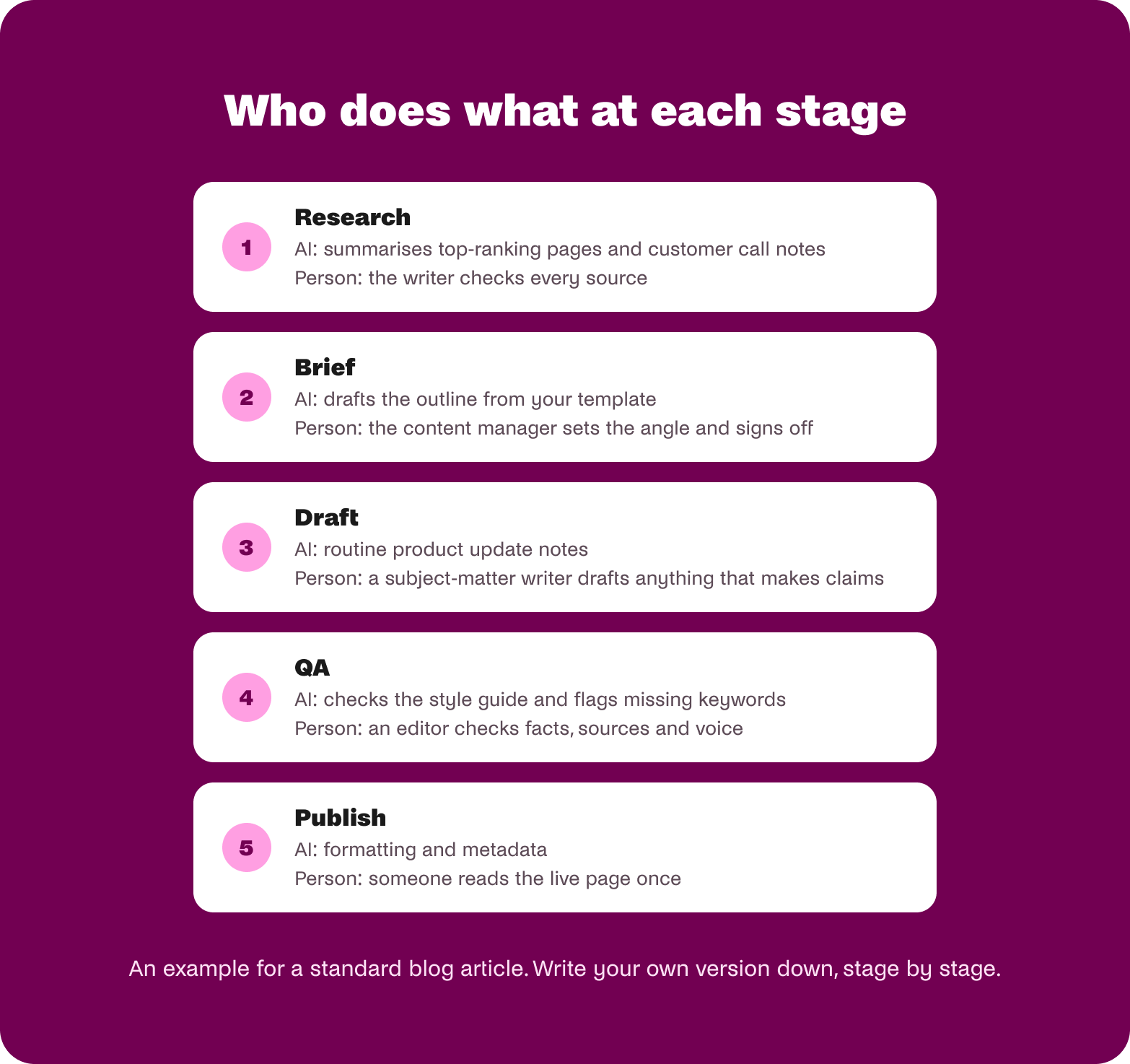
Simone Engbo Hansen's warning makes a useful test for each stage: "Ideas won't come faster just because you can produce the final output faster." We've argued before that AI exposes the content workflow you already have, and this fix is how you design for that.
Fix 8: Set external contributors up to succeed
Your freelance writers each work from a different version of the brand context, and every new agency writer restarts onboarding from scratch. That happens when context lives in a few people's heads and gets handed over in calls and email threads.
Build a standing context pack: tone of voice, approved claims, audience notes, examples of pieces that worked, and the review process they're entering. Give external contributors one point of contact and a consistent feedback format, so notes from different reviewers arrive as one set of decisions; a handover our guide to onboarding external content creators breaks down step by step.
Then match the writer to the piece. Good infrastructure makes good writers more consistently successful, and it still matters who you brief: a fintech explainer needs someone who knows the subject. Most of the mistakes teams make with content freelancers trace back to gaps in this setup.
Fix 9: Make performance data rewrite the next brief
The dashboard shows which pieces performed, and nothing changes as a result. Plenty of teams collect performance data without giving anyone the job of acting on it. The Rant Report found that only 14% of teams define good content as driving measurable outcomes, so the link between results and the next brief can easily go unmade.
Give one person a monthly review that ends with concrete edits to the brief template, and have them check what a result actually shows before anyone acts on it. Organic traffic tells you a page found readers. On its own, it says little about whether the format worked.
Say three long guides for content managers out-earned shorter posts on organic traffic last quarter. Look at what those visitors did next. If the guides also led to more demo requests or template downloads per visit, depth is likely part of the reason, and the brief template for that audience can ask for a worked example and a downloadable resource. If they simply ranked for broader terms, the lesson is about keyword choice, and the format can stay as it is. A ranking drop needs the same care: check what now ranks above you, whether search intent has shifted, and whether anything changed on the page before you rewrite the angle. Over a quarter, the template becomes a record of what your team has learned.
What this means for your content operations this quarter
Read together, the nine fixes share a pattern: the place a problem shows up and the place it starts are often different stages of your content management workflow.
Start with your loudest symptom
You don't need all nine this quarter. If version chaos costs you the most time, start with Fix 2. If pieces stall in review, start with Fix 5. If edits are heavy, look at the brief in Fix 4 and the AI decisions in Fix 7, and if freelancers keep missing the mark, begin with Fix 8. Run the mapping exercise in Fix 1 first if you're unsure, because it tends to show which symptom is loudest. A content strategy decides what to make; these fixes decide whether it ships on time and at the standard you set.

When the fixes become a second job
Each fix is simple to start. Keeping all nine running is harder, especially once production spans freelancers, agencies, internal experts and several markets, where localisation adds its own review loops. The Rant Report found that 43% of teams already spend 40% or more of their week on coordination and process instead of strategy or creative work. For a content manager in that position, maintaining the workflow can quietly become a second job.
How Contentoo approaches it
Contentoo works with content teams as a managed content workflow. Your team sets the strategy, brand standards and approval points, and Contentoo runs the production around them: a dedicated customer success manager, briefing, matching vetted experts to the subject, quality checks and revisions before a draft reaches your reviewers, localisation with native experts in each market, and delivery. Your team keeps the judgement calls and the internal approvals, while the chasing, re-briefing and handoffs between contributors come off your plate.
That's the model behind our Manage complexity use case, built for teams producing content across several contributors, tools and markets, on top of the CMS and project tools they already use.
Deiondre van der Merwe, Content Lead at Snitcher, named the standard every one of these fixes protects: "'this will do' is my enemy." A workflow that holds under pressure is how a team keeps that standard on its busiest week.
If keeping these fixes running has started to feel like a second job, that's the work Contentoo is built to take on. See how Contentoo helps teams manage complexity.
FAQs
What is a content management workflow?
A content management workflow is the agreed sequence of stages, owners and handoffs that moves a piece of content from request to publication and into performance review. It sits above your tools: the CMS, the content calendar and the project management tool are components it connects. A workflow is healthy when the agreed sequence and day-to-day workflow align closely.
What's the difference between a content workflow and a content management system workflow process?
A content workflow covers the whole journey, including the request, the brief, writer assignment, stakeholder review and performance follow-up. A content management system workflow process covers the steps the CMS itself enforces, such as draft states, review permissions, scheduling and publishing. Many delays happen in the wider workflow, which is why people often leave the CMS unchanged.
How do I know if my content management workflow is broken?
Three signals suggest a content management workflow needs work. Pieces regularly wait on approvals with no deadline or named owner. Writers ask the same clarifying questions piece after piece, which points to missing fields in the brief template. And performance reviews happen without changing how the next piece gets briefed. Two or more of these usually point to a process problem.
Do I need a new CMS to fix my content management workflow?
No, many teams can fix their content management workflow without a new CMS, because the common breaks sit in briefs, ownership, handoffs and approvals. A new CMS makes sense when the system itself blocks the process, for example when it can't hold the review states you need or turns publishing across sites into manual work. Even then, fix the process alongside the migration so the new system starts clean.
How does cloud content management modernise workflows?
Cloud content management modernises workflows by putting one live version of each piece, with its permissions and status, where every contributor can reach it. That removes the local copies and emailed attachments behind most version conflicts, and it makes handoffs visible as they happen. A vague brief or an approval without an owner will still slow the work, because those are process decisions the team has to make.
What's the fastest win in a content management workflow?
The fastest win in many content management workflows is giving every approval stage a decision window and a named approver. It also targets the stage The Rant Report identifies as the top-cited bottleneck in content production.
How should AI fit into a content management workflow?
AI fits best into a content management workflow when the team decides, stage by stage, what it automates and where a person makes the call. The Rant Report found that content briefs have become the top AI use case, while far fewer teams use AI for drafting. A sensible starting point is AI for research and brief preparation, human judgement on angle, accuracy and voice, and a review stage before anything goes live.