Top 9 content workflow software & tools for 2026

.png)
TL;DR
This article is a shortlist for content ops managers in active tool evaluation. Nine content workflow software tools are assessed against five criteria that matter at enterprise or mid-market scale: workflow configurability, brief and context management, talent and contributor coordination, AI governance, and multi-market support. Each entry carries an honest account of limitations, because a comparison that reads like a brochure for all nine is not a comparison. The tools covered range from purpose-built content operations platforms to headless CMS infrastructure, open-source automation layers, DAM-led workflow suites, and general project managers that content teams have bent into editorial service. Contentoo leads the list as the only platform that addresses both the workflow and talent coordination layers within a single product.
There are meetings that content ops managers know well. A senior manager asks why a piece that entered the workflow six weeks ago still hasn't been published. The answer involves a brief that was half-finished when the writer picked it up, a legal review that sat in an inbox for ten days, and a freelancer who had never viewed the brand guidelines.
Some platforms now treat brief quality, contributor context, AI governance, and multi-market localisation as the primary product rather than features bolted onto a task tracker. That distinction is what this shortlist is built around. Nine tools, five evaluation criteria, honest limitations for each, and a comparison table up front so the full picture is visible before going deep on any single tool.
This is not a list for teams figuring out what a content workflow is, but rather for teams that already know and need a shortlist they can defend in the meeting.
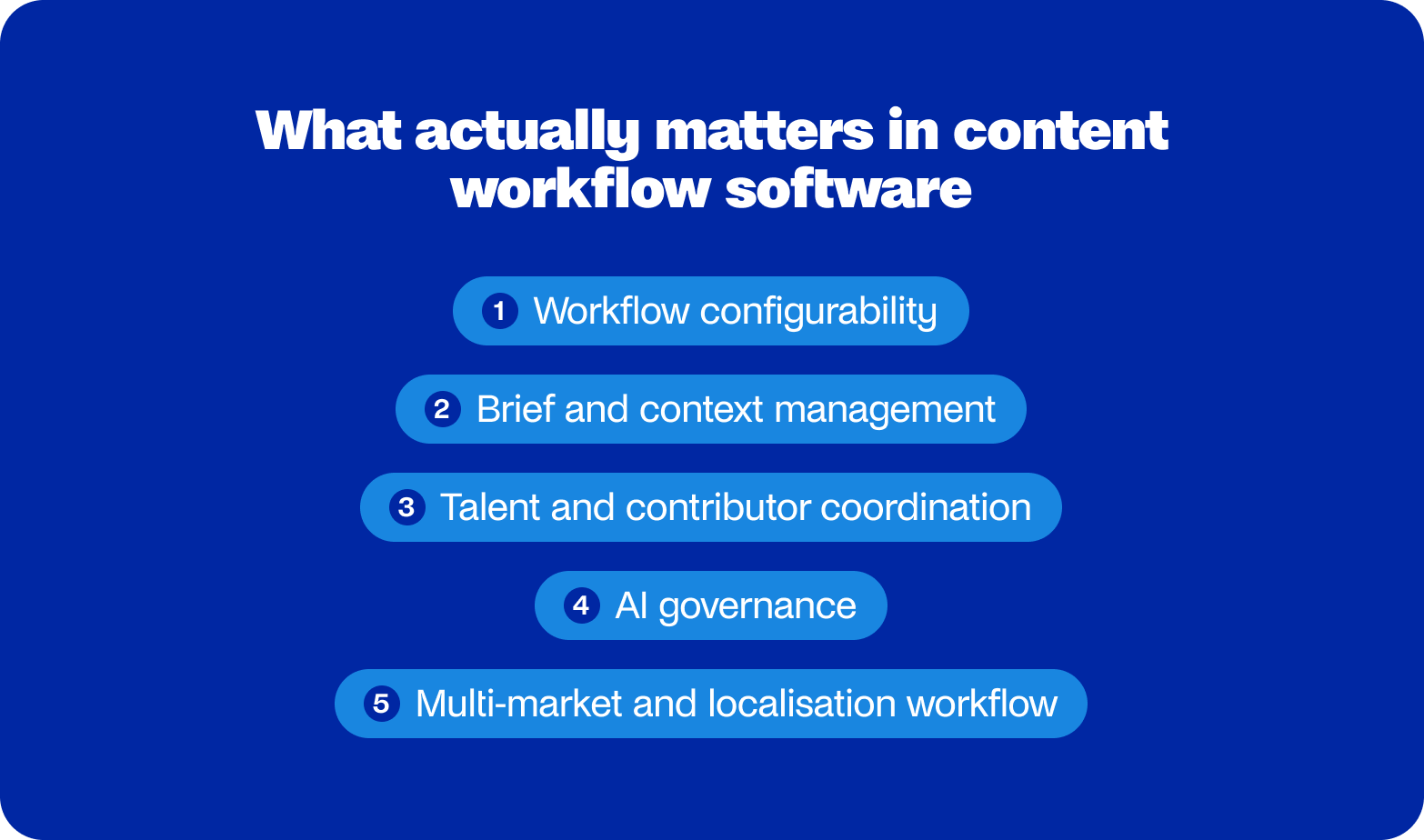
What actually matters in content workflow software
Most vendor comparison pages evaluate tools on ease of use, integrations, and customer support. Those things matter, but they're not where enterprise content ops decisions break down. Here are the five criteria worth applying.
Workflow configurability
The question isn't whether a tool has a workflow builder, since most do, but whether it can map your approval chain: the one that includes legal, a brand reviewer, two regional SMEs, and a localisation stage that only fires for certain markets. Tools that offer a default three-step model and call it configurable are describing their template, whilst leaving the hard structural work to the buyer.
Brief and context management
A brief that lives in a Google Doc, detached from the production system, is a brief that gets ignored by step three. The true test is whether context, including audience definition, tone of voice, SEO requirements, and SME inputs, travels with the piece through every stage. Most are expected to go looking for it. Most don't. The elements that make a brief actually work are worth reviewing before evaluating any tool claiming to manage them.
Talent and contributor coordination
Most enterprise content operations teams run work through freelancers, agencies, or specialist external contributors. The question is whether the workflow tool handles those relationships natively: access, assignments, handoffs, and feedback loops. Where the answer is no, a second system runs in parallel, and the seams between the two are where context goes missing. Building a workflow that genuinely accounts for external contributors requires more structural thought than most teams give it at the outset.
AI governance
Every platform has AI features. The relevant question is whether the team controls where AI fires, what it can and cannot do at each stage, and who reviews output before it reaches anything public. AI running inside a structured workflow with defined review gates behaves quite differently from AI generating drafts that move directly to a CMS, and the operational consequences of confusing the two tend to surface at the worst possible moment.
Multi-market and localisation workflow
For teams operating across languages and regions, the test is straightforward: is localisation a named workflow stage within the platform, with its own assignments and review steps, rather than a folder structure someone maintains manually in a shared drive? The latter is a filing system with ambitions, rather than a workflow with accountability.
TLDR: Five criteria separate tools that manage work from tools that manage the conditions that make work produce good content. Most tools only do the first.
How these content workflow tools compare
Before covering each content workflow tool, here is the full picture across all five criteria:
The 9 best content workflow software tools for 2026
The nine tools below cover the realistic range of what content ops managers at enterprise and mid-market scale are actually evaluating. Each entry is assessed against the same five criteria, with honest limitations included because a shortlist that glosses over the weak points of every tool on it isn't doing its job.
The comparison table above gives a quick view, whilst what follows is the reasoning behind it.
1. Contentoo: Best content workflow management software for complex teams
Who it's for
Content ops teams managing multi-party production across markets, contributors, and content types who need the workflow and the talent layer in the same platform.
Most content workflow tools are built around a flattering assumption: that the people side of production is already sorted. However, Contentoo starts from the other end by bridging the six-stage production system: brief, research, writing, editing, review, publish, and making it the product itself. Human experts, vetted freelancers, and AI agents all slot into whichever stages the team configures them for, and the workflow holds its shape regardless of who executes each step.
The brief and context layer is where this becomes structurally different from everything else on this list. Audience definition, tone of voice, SEO requirements, and SME inputs are held centrally and passed forward through every stage. Most output quality problems in content operations are upstream problems; however, Contentoo sets the context layer, and output quality follows — a principle that runs through how Contentoo approaches scaling content without proportional headcount growth.
The talent integration is the other distinction worth naming plainly. Contentoo's vetted freelancer network is brand-trained and managed within the platform. The outcomes speak for themselves: Venn Telecom entered three new markets and grew organic SEO by 77% without increasing headcount, whilst Meister scaled content output consistently without proportional hiring. For teams managing content complexity at this level, including CPG organisations running high volumes of assets across regional variants, Contentoo is the right starting point for your business.
Strengths
- The six-stage production system maintains structural integrity, whether a human expert, vetted freelancer, or AI agent executes each step, making it genuinely scalable rather than dependent on individual contributors.
- Brief and context management is native to the platform, so context travels with the piece through every production stage rather than getting lost between a Google Doc and a Slack thread.
- The vetted freelancer network is brand-trained and managed within the workflow, removing the second system that most teams currently run in parallel to coordinate external contributors.
- AI agents operate within configured workflow stages with human review gates that the team defines, rather than generating output that skips editorial oversight entirely.
- Multi-market localisation is a named workflow stage with its own assignments and target-language review steps, rather than a folder structure someone maintains in a shared drive.
Limitations
- Teams with simple, single-language operations and few external contributors will find the operational depth here more than their situation warrants.
- Enterprise procurement cycles tend to run longer than point-tool purchases, which is worth factoring into project timelines when speed of rollout matters.
Pricing
Custom, with a brief-by-brief commercial model and no long-term retainer requirement. Contact Contentoo directly for enterprise pricing.
2. Contentful: best content workflow tool for multi-channel publishing architecture
Who it's for
Developer-led teams that need structured content to flow from a single source across multiple front-end channels, and have the engineering capacity to configure and maintain that infrastructure.
Contentful is a headless CMS with workflow capabilities layered on top, and understanding the order of priority is the most useful thing a content ops manager can do before evaluating it. The content architecture underneath, which includes structured content models, API-first delivery, and multi-locale libraries, is genuinely strong for organisations publishing the same content across web, app, and whatever else the front end demands. The workflow layer is functional and configurable, whilst remaining entirely dependent on developer involvement to map to anything beyond the default setup.
Strengths
- The structured content model is among the most capable in the market for teams publishing simultaneously across multiple front-end channels.
- The API ecosystem is wide and well-documented, supporting deep integration with existing CMS, CRM, and commerce platforms.
- Multi-locale content libraries scale well for large organisations managing substantial content volumes across languages and regions.
- The developer community and documentation are strong, considerably reducing onboarding time for engineering teams.
Limitations
- Meaningful setup overhead sits between purchase and a functioning workflow, and it requires developer capacity rather than ops-team configuration.
- Editorial workflow features need customisation to handle approval chains of any real complexity, making them poorly suited to teams without dedicated engineering support.
- There is no native talent or freelancer management, so external contributor coordination runs through a separate system regardless of how well the CMS is configured.
Pricing
Mid-market to enterprise, with Scale and Enterprise tiers quoted on request. Implementation costs, on top of the licence fee, are worth including in any budget estimate from the outset.
3. Narrato — best content workflow software for AI-assisted production at SMB scale

Who it's for
Content marketing teams wanting AI-assisted production within a managed editorial workflow, particularly those at a smaller scale, evaluating options before graduating to an enterprise platform.
Narrato positions itself as an all-in-one content workspace, combining briefs, AI writing assistance, workflow boards, external contributor management, and publishing connections within a single interface. The feature coverage is genuine for the price tier, and the workflow builder supports custom stages with role-based assignments, making it more configurable than most tools in that part of the market.
The external contributor layer is worth noting specifically, since it handles assignments, feedback, and payments within the platform rather than routing them through a separate system.
Strengths
- Workflow configurability is solid for the tier, with custom stages and role-based assignments available without developer involvement.
- AI writing features are integrated into the workflow stages themselves, rather than sitting as a separate tool that the writer switches between.
- External contributor management covers assignments, feedback, and payments within a single interface, reducing the coordination overhead that typically runs through email.
- SEO brief generation is built in, which removes one of the more time-consuming upstream steps for content teams producing at volume.
Limitations
- AI output governance is manual throughout, meaning review gates depend on individual discipline rather than structured workflow enforcement.
- Brand voice consistency relies on writers' familiarity rather than system-level controls, making quality harder to maintain as the contributor roster grows.
- Multi-market and enterprise-scale workflows will outgrow the platform relatively quickly, making it a reasonable starting point rather than a long-term infrastructure choice for complex operations.
Pricing
SMB-oriented pricing tiers, not positioned for enterprise procurement. Worth setting internal expectations accordingly before including it in a formal shortlist.
4. HubSpot Marketing Hub — best software for managing content workflows inside a CRM stack

Who it's for
Marketing teams whose content production is tightly coupled to campaign timelines and CRM data, and who want workflow management sitting inside the same platform as their inbound activity.
HubSpot's content workflow capability lives within a broader marketing platform, and that context is the right lens through which to evaluate it. For teams where content production feeds directly into lead-nurturing sequences, campaign scheduling, and CRM reporting, the value of the integration is tangible and removes genuine friction. Task assignments, editorial calendar views, approval flows, and publishing to the HubSpot CMS all sit within a single interface, which simplifies the operational picture considerably.
Strengths
- The CRM and content integration is genuinely useful for inbound marketing teams, connecting content performance data directly to pipeline activity without manual reporting.
- The editorial calendar and campaign scheduling are in the same view, reducing the context switching that typically comes with managing content and campaigns across separate tools.
- Approval workflows are straightforward and well-suited for teams operating at moderate complexity and with a predominantly internal contributor model.
- Content performance reporting is tied to pipeline data, making the ROI case for individual pieces more visible than in standalone content tools.
Limitations
- Multi-party and multi-market approval chains are poorly served by the workflow model, which was designed around campaign production rather than complex editorial governance.
- There is no native freelancer or external contributor management, so any operation involving external parties requires a parallel coordination system.
- Content types are largely constrained to those the HubSpot CMS supports natively, with API workarounds required for anything sitting outside that architecture.
Pricing
Marketing Hub Enterprise is the relevant tier at this scale, quoted on request. Total cost rises considerably with contact volume and feature usage, making a full cost projection worth running before committing.
5. Airtable — the most configurable content workflow template platform for ops-minded teams
Who it's for
Teams with a dedicated ops function and the appetite to build and maintain a custom workflow layer on top of a flexible relational database, rather than buying a pre-configured content operations platform.
Airtable is a relational database with views, automations, and an interface builder. It is not content workflow software in the sense that it was not designed for content operations and lacks native content production features. What it does have is genuine structural flexibility, and enough content ops teams have built their workflow management on top of it that Airtable now provides content workflow templates to lower the initial configuration barrier, which are a useful starting point, whilst the underlying capability is what actually determines whether the tool serves the team well over time.
The appeal is a high degree of control over how the workflow is modelled. Teams can map their actual approval chain, not a vendor's interpretation of what that chain should look like, and the automation layer handles status-triggered notifications, deadline escalations, and ownership routing without requiring engineering support.
Strengths
- Configurability is among the highest of any tool on this list, with the workflow model entirely determined by the team rather than constrained by a vendor's default architecture.
- Scales from simple to sophisticated within the same tool, meaning teams can start with a basic setup and add complexity incrementally as the operation grows.
- Automation capabilities via Zapier, Make, or Airtable's native flows handle coordination overhead well once the underlying structure is in place.
- A multi-user interface with role-based views enables different stakeholders to interact with the same data in ways appropriate to their roles.
Limitations
- There is no native content writing or editing environment, so the workflow management layer sits entirely separately from wherever content is actually produced.
- No AI content features are built in, and no talent or freelancer management is available on the platform.
- The real cost of Airtable for content ops is the internal time required to build, maintain, and evolve the configuration as the operation changes, rather than the licence fee itself.
Pricing
Enterprise plan available with advanced permissions, admin controls, and SSO, quoted on request. Budget the internal configuration time alongside the licence cost when making the comparison.
6. Asana — best content workflow tool for teams already running on an enterprise PM platform
Who it's for
Teams where content production sits within a broader project portfolio managed on a tool the wider organisation already uses, and where consolidation onto a single platform outweighs the benefits of a purpose-built content ops solution.
Asana earns its place on this list primarily through prevalence rather than content-specific capability. A significant proportion of enterprise content ops teams run their workflows on it simply because the rest of the organisation already does, and the argument for consolidation on a familiar platform is often more persuasive internally than the argument for a specialist tool.
The content workflow template library gives teams a workable starting point: editorial calendar views, approval tasks with assignees and due dates, and portfolio-level visibility across multiple content programmes. Asana Intelligence, the platform's AI layer, is oriented around task management rather than content production, covering workflow suggestions and project summarisation rather than brief generation or editorial governance. For teams whose content ops complexity is at the lower end of the scale and whose primary need is coordination visibility rather than deep editorial infrastructure, Asana is a capable, low-friction option.
Strengths
- Project portfolio visibility is strong, making it straightforward to track content programmes alongside other workstreams the organisation manages on the same platform.
- Workload management and reporting give team leads a clear view of capacity across contributors, which is useful for teams managing volume at scale.
- The integration ecosystem is broad, supporting connections to most CMS, CRM, and communication tools that an enterprise content team is likely to be running.
Limitations
- Content-specific features extend only as far as task management, meaning brief management, brand voice governance, and editorial quality controls all sit outside the platform.
- Approval workflows are basic for operations involving multi-party chains, with no native support for conditional routing or stage-specific reviewer assignments.
- There is no freelancer or external contributor management, and no AI content generation or brief management capability.
Pricing
Enterprise tier available with custom pricing, advanced security, and admin controls. For organisations already running an org-wide Asana contract, the marginal cost of extending it to content workflow use cases is typically low.
7. Monday.com — best visual platform for content workflows sitting alongside other projects
Who it's for
Teams that want a visually intuitive project management platform with solid automation, and whose content workflow sits alongside other project types rather than operating as a standalone content ops function.
Monday.com covers broadly similar ground to Asana, whilst differentiating itself on interface design and the visual clarity of its board layout. The automation layer is a genuine strength: status-triggered notifications, deadline escalations, and ownership routing all work well and reduce the coordination overhead that accumulates in teams managing content alongside other project types. The content-specific template library covers editorial calendars, planning boards, and content request intake forms, giving teams a functional starting point without requiring significant upfront configuration.
Strengths
- The visual board interface is among the most intuitive of any tool on this list, making it straightforward to onboard new team members and give stakeholders visibility without training.
- Automation capabilities handle coordination overhead well once the board structure is in place, reducing the manual chasing that typically consumes ops time.
- Intake form functionality is strong, making it a useful tool for managing content requests from across the organisation into a single, trackable queue.
Limitations
- Content production features extend only to task management, with no native support for brief management, AI governance, or editorial quality controls.
- Approval workflow depth is limited for operations involving conditional routing or multi-party review chains with different reviewers per content type or market.
- There is no talent or freelancer management and no AI content generation capability within the platform.
Pricing
Enterprise tier available with custom pricing. For organisations already running Monday.com across the wider business, extending it to content workflow use cases carries a low incremental cost argument similar to Asana's.
8. Bynder — best content workflow software for brand asset governance and DAM integration
Who it's for
Brand and content teams managing high volumes of visual assets alongside written content, where the governance, versioning, and distribution of those assets is as much an operational challenge as the production itself.
Bynder sits at the intersection of digital asset management and content workflow, and the distinction between those two things is important for any content ops manager evaluating it. The platform's primary strength is the DAM layer: brand imagery, product photography, and campaign creative all flow through a structured approval and versioning system before landing in a governed asset library from which distribution to agencies, partners, and internal teams is controlled. The workflow module sits on top of that architecture, managing asset creation from brief through approval and into the DAM with review stages, annotation, and version control throughout.
Strengths
- The DAM is class-leading for brand-heavy organisations managing large volumes of visual assets across internal teams, agencies, and distribution partners.
- Brand governance and approval tooling for visual assets is strong, with version control and annotation built into the review process rather than managed externally.
- Agency and partner distribution portals give external parties structured, governed access to approved assets without requiring direct platform access.
Limitations
- Editorial workflow capability for written content is limited, making it poorly suited to teams whose primary production challenge is text-based rather than asset-based.
- Implementation complexity is significant at enterprise scale, with meaningful onboarding and configuration work required before the platform delivers its full value.
- There is no talent management or content-generation capability, and enterprise-scale pricing reflects the platform's positioning as a specialist infrastructure investment.
Pricing
Enterprise only, with custom quotes. Bynder sits at the higher end of the investment range on this list, and the implementation costs alongside the licence fee are worth factoring into any budget projection.
9. Activepieces — best content workflow automation solution for technical teams connecting existing tools
Who it's for
Technical content ops teams with a fragmented tool stack and the engineering appetite to build an automation layer that connects those tools, rather than replacing them with a single platform.
Activepieces is an open-source automation platform rather than a content workflow platform, and that distinction is the most useful framing for any content ops manager considering it. It does not manage briefs, coordinate contributors, govern AI output, or provide an editorial environment. What it does is connect the tools that handle those tasks, handling the automation logic across a CMS, a project management tool, a social scheduler, a review notification system, and whatever else the stack contains. For teams whose workflow problem is the friction between existing tools rather than a missing operational layer, Activepieces addresses the right problem at a lower cost than replacing the stack entirely.
Strengths
- Open-source architecture with a self-hosted option removes per-seat pricing constraints and third-party cloud dependencies for teams with the infrastructure to manage it.
- Automation flexibility is strong, handling multi-step workflows across tools with more configurability than most no-code automation platforms at comparable cost.
- AI step support is growing, enabling the creation of automation pipelines that incorporate AI-assisted steps into a larger workflow.
- The integration library is active and expanding, covering most tools a content ops team is likely to be running across CMS, project management, and distribution.
Limitations
- Configuration requires technical capacity and is not accessible to non-technical ops teams without developer support, making it unsuitable as a standalone solution for most content operations functions.
- Workflow visibility is at the automation level rather than the editorial level, meaning there is no native view of the content stage, contributor status, or brief quality within the platform.
- The community-first support model is not suited to enterprise teams requiring guaranteed response times or dedicated account management.
Pricing
Open-source self-hosted option available, with cloud plans for teams that prefer managed infrastructure. Positioned as a technical layer within a broader content ops stack rather than a standalone platform investment, and priced accordingly.
Which content workflow software fits your team?
The right answer depends almost entirely on where your process actually breaks down, rather than which tool has the longest feature list. Here is a quick guide to matching the shortlist to your situation.
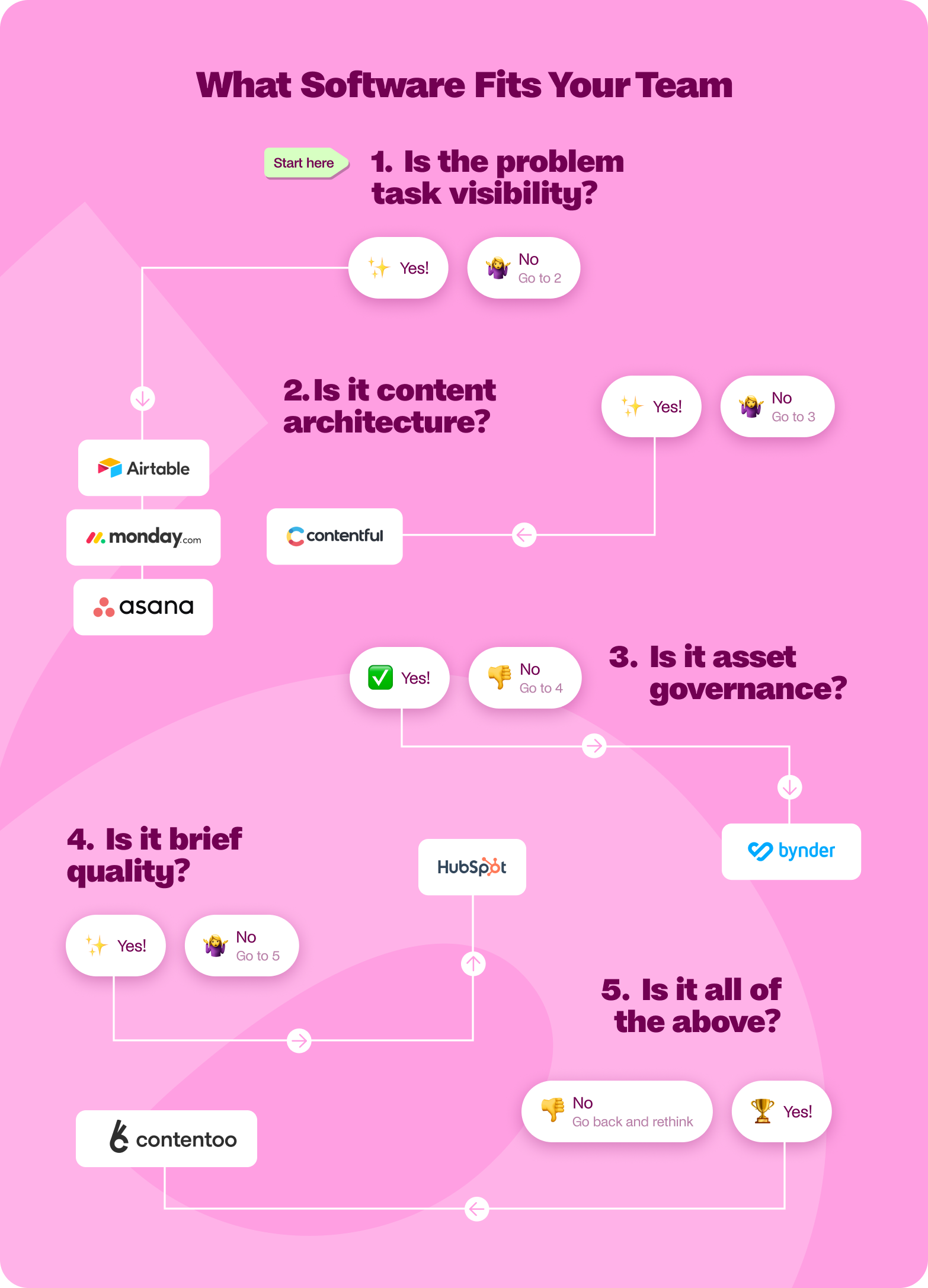
If the primary problem is task coordination and visibility, knowing what stage a piece is at, who owns the next step, and whether deadlines are being hit, consider:
- Asana, if the wider organisation already runs on it, and consolidation onto a single platform is a priority
- Monday.com, if a more visual board interface and stronger automation, would reduce coordination overhead
- Airtable, if the ops team has the appetite to build a custom workflow layer with full control over how it is structured
None of these will improve brief quality or fix brand voice inconsistency, but they will give the team a shared view of the production queue.
If the primary problem is content architecture, where the same structured content needs to live across multiple channels and front ends simultaneously, Contentful is the technically sound choice, assuming there is engineering capacity to configure and maintain it. It is an infrastructure investment rather than an ops tool, and the distinction matters when scoping the project internally.
If the problem is asset governance, with creative and brand assets being used out of date or off-brand by internal teams and external partners, Bynder addresses something the other tools on this list do not. It is a specialist answer to a specific problem, and the right one within that frame.
If the problem is brief quality and context loss, where content consistently misses the mark despite writer changes or AI adoption, the issue sits upstream of the workflow rather than in it. Most tools on this list do not treat brief management as a first-class feature, and the ones that don't will not fix this particular problem regardless of how well they handle task coordination.
If the problem is all of the above, with a freelancer or agency roster being coordinated by email on top of everything else, the shortlist narrows considerably. Most content ops teams at scale are running several of these problems simultaneously, each managed in a different tool, with the gaps between those tools doing a reasonable impression of a workflow. That kind of complexity has a specific solution, and it is not adding another point tool to the stack.
The thing is, the question most teams ask when shortlisting workflow software is which tool has the features they need. The more useful question is which layer of the production process is generating the most downstream damage.
Fix that layer, and the rest tends to follow. Pick a tool that addresses only the surface, and the same problems resurface in a different form, often faster than before.
TLDR: Match the tool to the layer where your process breaks, not to the longest feature checklist. Most teams have more than one broken layer, which is where the shortlist narrows.
If your content operation involves multiple markets, external contributors, or an approval chain that nobody fully owns, Contentoo is built for exactly that level of complexity. The workflow, the talent, and the governance layer all sit in one place, with no long-term retainer required to get started.
Book a demo and see how it works in practice.
FAQs
How is content workflow software different from a project management tool?
Project management tools track tasks, deadlines, and assignees. Content workflow software manages the full content production process: brief quality, contributor context, approval routing, AI governance, and publishing, with the editorial logic built into the workflow rather than approximated through task labels and manual chasing. Most content ops teams start with a project management tool and hit its ceiling when the operation grows beyond a single team, market, or content type. The switch occurs when the quality of the workflow's output becomes the primary problem.
What should we look for when evaluating content workflow software for an enterprise team?
The five criteria that matter most at enterprise scale are workflow configurability against your actual approval chain, brief and context management that travels with the piece through every production stage, native talent and contributor coordination rather than a parallel system running alongside the platform, structured AI governance with human review gates the team controls, and multi-market localisation as a named workflow stage rather than a manual folder structure. Most platforms meet one or two of these well. The shortlist narrows considerably when all five are applied together.
Can content workflow software manage external contributors and freelancers natively?
Most cannot. The majority of content workflow platforms are built around internal team coordination and treat external contributors as a workaround, typically managed through guest access, email notifications, or a separate freelancer management system running in parallel. A small number of platforms, Contentoo among them, treat talent coordination as a core part of the workflow rather than an adjacent problem. For enterprise teams managing content across multiple markets with a mix of internal and external contributors, the distinction between native talent integration and a bolted-on guest access model has significant operational consequences at scale.
How does content workflow software handle AI governance?
The honest answer is that most platforms add AI features without the governance infrastructure to support them. AI-powered content workflows that actually work in an enterprise context require defined stages at which AI can and cannot act, human-review gates before AI output moves to the next stage, and audit visibility into what was generated versus what was edited. Teams that adopt AI tools without building that structure into the workflow tend to discover the consequences at the point of publication rather than before it. When evaluating any platform's AI capability, the governance question is more important than the generation question.
How difficult is it to migrate from an existing tool to a new content workflow platform?
Migration complexity depends primarily on how much of the workflow currently lives inside the tool versus outside it. Teams running content production across Google Docs, email threads, and a task tracker typically find migration straightforward because the workflow is not deeply embedded in any single system. Teams that have built significant configuration into an existing platform, particularly those on Airtable or a custom CMS workflow, face a higher switching cost. The more useful question before evaluating migration effort is whether the current tool is a genuine workflow platform or a task tracker the team has grown dependent on, since the two carry very different migration profiles.
How do you build a content creation workflow that scales across marketing departments and digital teams?
A scalable content creation workflow covers the entire content process from surfacing content ideas and keyword research through the creation phase, editing, a structured approval process with the right stakeholders involved, metadata tagging, and direct publishing to relevant channels, whilst keeping brand consistency and a defined target audience at the centre of every stage.
.png)





.webp)