How to master digital content workflow: a step-by-step guide for 2026

.png)
TL;DR
This article is for content marketing managers at digital-first brands who already have a digital content workflow and are frustrated that it keeps breaking. The argument: the problem isn't your process document. It's that your tools (CMS, DAM, CRM, analytics) don't share context, so every handoff between them is a manual job you weren't hired to do. You bought the tools to build a workflow, and somewhere along the way you became the workflow, the thing quietly holding all of it together. This guide maps the friction points and shows what it looks like to stop being the integration layer yourself.
You have a documented content workflow. You have the tools: a CMS, a DAM, a CRM, analytics. And yet content keeps dying somewhere between them. Briefs go into one system, assets sit in another, performance data lives in a third, and the handoffs between them are held together with email threads and manual exports.
"Everything is connected, but nothing's connected." That's how Bojana Vojnović at HeyReach described the experience. It lands because it's true: digital content production fails not at the creation stage but in the spaces between systems, the transitions no one owns. You bought the CMS, the DAM, the CRM, and the analytics platform to make the operation easier. Somehow you became the thing connecting all of them.
Contentoo's State of Content study found that 90% of teams say content demand increased in the past 12 months, and fewer than half say headcount or budget kept pace. That gap closes by removing the coordination overhead that takes your time before you touch strategy or creative work. This guide doesn't define what a digital content workflow is, but it shows why connecting the tools in your content stack is harder than step-by-step guides suggest, and what it looks like to fix that without becoming an integration engineer.
Why digital content workflows are harder than they look
The surface problem is straightforward. The content creation process runs across different platforms: content lives in one system, assets in another, audience data in a third, performance data in a fourth. A functional digital content workflow has to bridge all four, and most tools weren't designed to talk to each other.
Name the handoffs and the friction becomes visible. A brief starts in Google Docs or a project management tool. It moves to creation, then into the CMS for formatting, SEO tagging, and scheduling. Along the way, the piece references assets from the DAM, targets segments defined in the CRM, and eventually needs to be measured against analytics goals. Each transition is a manual step. Each step is a chance for context to drop.
The pressure compounds as content volume climbs. According to Contentoo's State of Content study, 43% of content professionals spend 40% or more of their working week on coordination and process tasks, not strategy, not creative work. Nearly half the team's week disappears into a content production process that moves content between systems and reconciles information that should already be connected.
What this produces is predictable: inconsistent messaging across channels, brand consistency problems when different stakeholders touch the same piece, approval delays when no one can see where the content sits. These are the common workflow challenges every digital-first team knows by name. The documented workflow exists. The workflow that actually works does not.
TL;DR: The bottleneck isn't how fast you can create content. It's how much friction lives between the tools that move it.
What most teams get wrong
The assumption most guides make: if you document your workflow, it will work. This is the wrong diagnosis.
Here's the counterintuitive finding, drawn from Contentoo's State of Content study. 65% of teams say they have a fully documented content workflow. 76% of those same teams still regularly publish content they know isn't good enough. A workflow on paper is not a workflow in practice.
The gap isn't documentation. It's that the document describes a world where your tools cooperate, and the reality is one where they don't. Manual workflows (brief in Google Docs, download from the DAM and re-upload to the CMS, approval chains managed in email) are not workflow failures. They are the workflow. And they produce predictable quality problems: briefs arrive incomplete, assets get version-mismatched, brand voice gets diluted through rounds of committee editing, and teams keep publishing outdated pages because no one caught them in time. Marketing departments running on manual processes learn to expect this.
The secondary mistake is reaching for more tools. Another project management platform to coordinate the existing tools adds another handoff, not fewer. Contentoo's State of Content study names internal review and approvals as the top-cited bottleneck in content production, cited by 45% of teams, with getting a clear brief cited by 41%. Neither problem is solved by adding another layer to the stack. If you want to do more without adding headcount, the answer is fixing the process, not stacking tools.
There's a distinction worth naming here. A task-based workflow gets one thing right: clarity of ownership. It assigns a responsible person to each step. But task-based workflows also assume linear handoffs between cooperating systems, and status-based workflows only help you see where a piece sits, not close the gaps between tools. A digital content workflow across CMS, DAM, CRM, and analytics rarely delivers cooperation on its own. The systems don't share context, so the based workflows you document still need someone to bridge them by hand at every transition.
TL;DR: Having a documented workflow and having a workflow that works are not the same thing. The gap lives in the handoffs, not the document.
The case for system-led workflow design
There's a distinction that matters here: a patched workflow versus a structured content workflow that is system-led.
A patched workflow connects your tools with manual steps: export this, re-upload that, copy the metadata here, update the status there. It works when volume is low and stakes are manageable. It breaks when content demand goes up, when stakeholders multiply, or when you publish across markets and formats. It is not a well defined workflow. It's a set of habits that happen to hold.
A system-led workflow is different. Brief information flows into the CMS automatically. DAM metadata tags follow assets wherever they go. CRM audience data informs targeting at the planning stage, not as an afterthought. Analytics performance data feeds back into the content calendar without anyone exporting a spreadsheet. This is what content workflow software should do: hold the structure so people don't have to.
Here's the insight most teams miss: whether your tools share context or fight you at every handoff is baked into the tools themselves, and no amount of process documentation changes that. A well-defined workflow inside a fragmented system is still fragmented, and no structured process survives contact with tools that ignore each other. The real diagnostic is simple, and it has nothing to do with technical architecture: name every place where you, personally, are the one manually carrying information from one system to another. That's you doing the tools' job for them.
The question for managers who can't rebuild their existing tools from scratch: what sits above the tools and coordinates them? That coordinating layer, whether a platform, a workflow system, or an operations partner, is where the work gets done, and it's also your natural bridge out of being that layer yourself. Good workflow management means the workflow becomes the product, not a side effect of your tools, and not a side job for you.
One more consideration: this system should not require developer intervention for routine content operations. It has to work for non-technical users. If publishing a page or updating a DAM tag requires a ticket to IT, the system isn't designed for content teams. It's designed for someone else.
TL;DR: Connecting your tools is not a workflow problem. It's a product architecture problem. Solve it once, not every time you publish.
Building the digital content workflow: CMS, DAM, CRM, and analytics in sequence
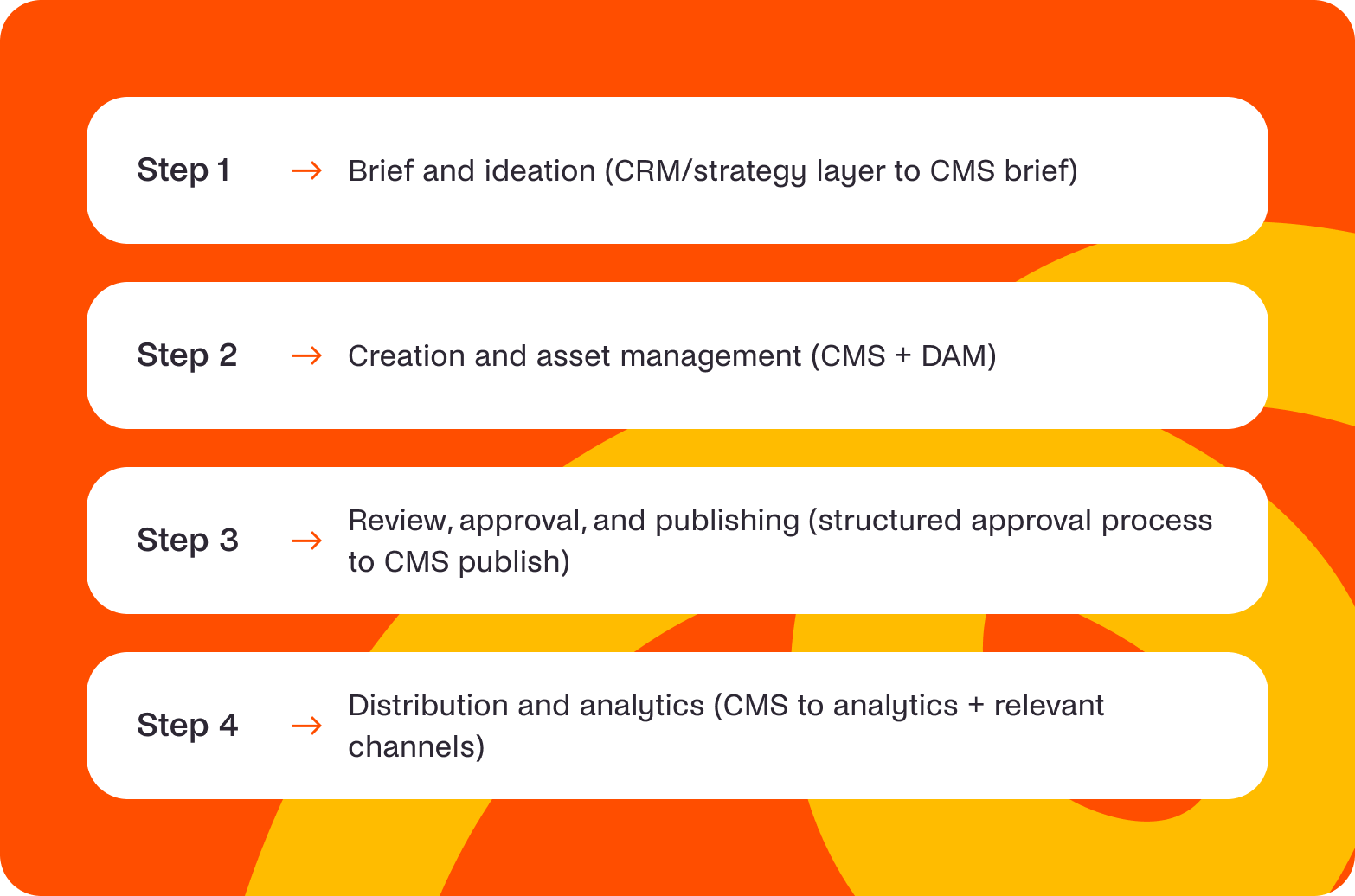
Map the digital content workflow in four connected stages. Each stage names the primary tool, what it needs to receive from the previous stage, what it sends to the next, and where the common failure mode lives. Map these same four stages onto a one-page checklist your team can run against before your next platform migration.
Stage 1: Brief and ideation (CRM/strategy layer to CMS brief)
What goes in: Audience segment data from your CRM, keyword research targets, a content calendar slot, and the campaign brief. This is where content ideas become a plan tied to a target audience.
What must transfer: Topic, target audience, goals, and SEO targets that affect search rankings, not just a headline. The brief should carry enough context that a writer, or an AI, can start without a discovery call.
Common failure: The brief lives in Google Docs and doesn't connect to the CMS. The writer starts fresh without audience context. The approval process is separate from the creation context, so stakeholders involved in the brief don't automatically see the draft. When 41% cite getting a clear brief as a top bottleneck, this is where that bottleneck forms.
Do this: Map this stage as it actually runs today, not as it's documented. Identify the exact handoff where the brief leaves Docs and where audience context from the CRM would need to enter. Decide which fields should transfer automatically (topic, audience, SEO targets) versus which genuinely need a human decision. Remove the manual re-typing step first; it's usually the fastest fix in the whole workflow.
Tools relevant here: Content calendar, keyword research platforms, project management tools, and structured content briefs. Project managers lean on task tracking to keep content projects moving, and teams that create product led blogs feel this stage most, because the brief has to carry commercial intent as well as topic.
Stage 2: Creation and asset management (CMS + DAM)
What goes in: The approved brief, brand assets from the DAM, and approved imagery with usage rights and version information. This is the heart of content creation, where the entire content process either holds together or starts leaking.
What must transfer: Asset metadata, usage rights, version control. When an image moves from DAM to CMS, the metadata tagging should follow without manual re-entry, so quality control isn't left to memory.
Common failure: Assets get downloaded from the DAM and re-uploaded to the CMS. Metadata is lost. Version mismatches appear when someone updates the source file and the CMS copy doesn't sync. Brand voice documentation exists somewhere, but it's not embedded in the content creation workflow where writers can see it, so brand consistency slips.
Do this: Map how an asset actually travels from DAM to published piece right now, not the ideal version. Identify the download-and-reupload handoff specifically; it's almost always where metadata gets lost. Decide whether metadata tagging can transfer automatically with the asset. Remove the manual re-entry step, and the version-mismatch problem usually shrinks with it.
Tools relevant here: The content management system, the DAM, style guides, tone-of-voice documentation, and collaboration features that let team members collaborate efficiently on the same piece without stepping on each other. A content management workflow that embeds those assets keeps the work honest. When you run multiple websites, this stage decides whether high quality content holds consistent quality or drifts.
The same discipline applies at Stage 2 as anywhere else: fix the upstream constraint before you add capacity downstream.
For a practical companion on making this scale, see Contentoo's actionable tips on content scaling.
Stage 3: Review, approval, and publishing (structured approval process to CMS publish)
What goes in: The completed draft, the stakeholder list, and the approval gates that lead to final approval.
What must transfer: Approval status, publish date, and the final metadata tags the CMS needs before it can publish content.
Common failure: Email chains break review accountability. Two weeks pass between draft and publish when six or more stakeholders are involved. Brand voice gets diluted by committee. Contentoo's State of Content study found that too many stakeholders diluting the message is cited as a quality killer by 40%.
As Simone Engbo Hansen, Content & Communications Lead at Airtame, put it: "I tried having things sign off before going live. Someone had to sign off, then it had to go to the board, and the diluted version came through the manager three months later. That's where a content angel loses her wings."
Do this: Document who actually signs off today, not the org chart version. Identify the handoff where the piece disappears into email; that's usually where accountability breaks. Decide who is genuinely accountable versus who is just consulted, and put that in writing. Remove the informal email approval chain and replace it with a visible status, even a basic one.
Tools relevant here: CMS workflow features, approval chain tools, and status-based review process tracking that shows exactly where a piece sits.
Stage 4: Distribution and analytics (CMS to analytics + relevant channels)
What goes in: Published content, a distribution plan across relevant channels, and performance goals.
What must transfer: UTM tracking parameters, performance benchmarks, and a content calendar feedback loop that turns numbers into data driven insights.
Common failure: Performance data lives in analytics and never feeds back into the content calendar. Social media posts go out, but the team planning next quarter doesn't see which topics performed. Content is published and forgotten. Repurposing decisions, whether landing pages, blog posts, or engaging social media posts, get made without data.
Do this: Know where performance data currently goes after publish, and how far it travels before someone actually looks at it. Identify the handoff between analytics and content planning specifically; it's usually a gap, not a bottleneck, meaning nothing bridges it at all. Decide what one or two metrics should feed back into planning automatically. Remove the manual spreadsheet export that currently stands in for that feedback loop.
Tools relevant here: Analytics platforms, social media scheduling tools that social media managers rely on, and a content calendar with performance tracking built in.
TL;DR: Each handoff in the digital content workflow is a place where context gets lost and quality drops. Map the four stages, name the failure mode at each, and fix the handoff, not the tool.
Where AI fits, and where it breaks a fragmented workflow
AI use is already near-universal in content teams. Contentoo's State of Content study found that 85% use AI regularly. But here's the surprise: the top use case isn't drafting. Content briefs are the top AI use case, cited by 46%, while AI drafting is cited by only 21%.
Here's the part that's specific to everything this article has been diagnosing: AI is only as useful as the context it can actually reach. If audience data lives in the CRM, brand context lives somewhere else entirely, the brief sits in Google Docs, and performance data sits in analytics, AI doesn't magically connect any of that on its own. It works with whatever's in front of it, and if what's in front of it is one fragment of a scattered system, that's what it optimises. Fragmented context limits what you can automate intelligently, in exactly the same places this article has already mapped.
The common misapplication is using AI-powered tools to speed up creation inside a workflow that remains fragmented. AI-drafted content still has to be manually moved from tool to tool. The brief still arrives incomplete. The DAM still doesn't talk to the CMS, and the time saved in drafting gets absorbed by the coordination overhead that hasn't changed.
Where AI genuinely helps is inside a system-led workflow, applied to the manual tasks that don't need judgment:
- Automating brief creation with structured prompts and audience data pulled from your CRM, so the writer starts with context instead of a blank page.
- Metadata tagging for DAM assets using a consistent taxonomy, so the repetitive tasks of cataloguing stop eating creative time.
- First-draft generation within a connected CMS where the brief, style guide, and brand voice are already present.
Add to that performance analysis against published targets, feeding recommendations back into the content calendar so last quarter's numbers shape next quarter's plan. This is where workflow automation earns its place: AI-powered content workflows compress the parts that should be fast, because the system is already sharing context. Automation platforms and AI tools add speed without adding coordination overhead. The AI operates inside a structure, not around it.
One more reality: Contentoo's State of Content study found that 95% of teams always or usually have a human review before publishing. This is not a transitional phase. It's a structural feature of responsible content production. AI in the workflow means faster production to the human review gate, not past it.
AI is only as useful as the workflow, and the context, it operates inside, so give it a system-led workflow, and it compresses the parts that should be fast.
What this means for your content team
For the content marketing manager, mastering a digital content workflow in 2026 is not about finding the right process document. It's about no longer being the integration layer yourself, the person manually carrying context from CRM to brief to CMS to analytics because the tools won't do it for you. That decision shapes your whole content marketing strategy, because the system you choose sets the ceiling on what the team can do.
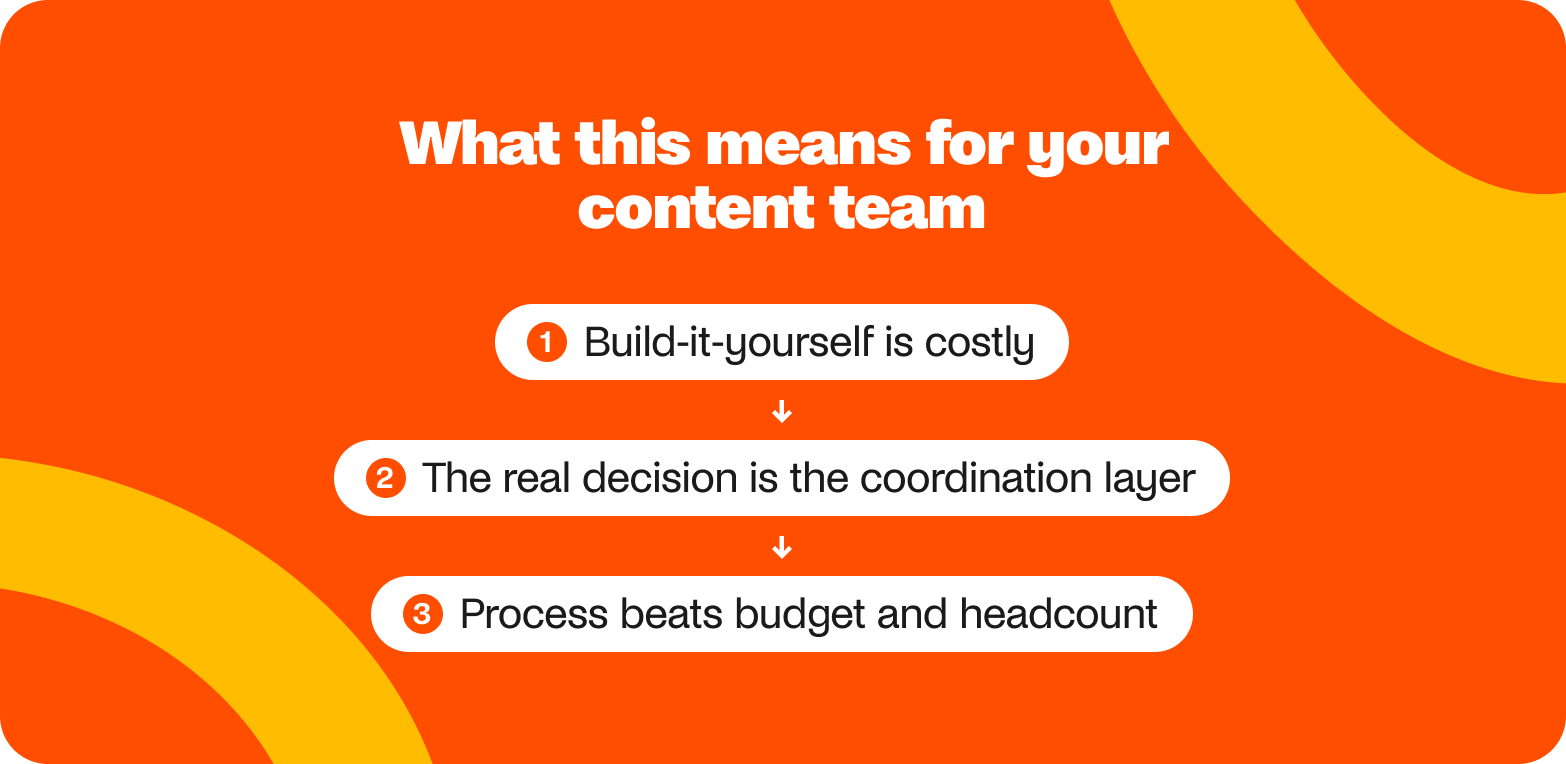
The build-it-yourself path is possible. It's also expensive in time and integration maintenance. Every new tool adds a handoff. Every integration is a project that pulls the content team away from strategy, and back into the role of connective tissue.
This is specifically what Contentoo takes off a content manager's plate:
- CRM audience data that would otherwise need manual re-entry into the brief.
- DAM metadata that would otherwise get lost between download and re-upload.
- The approval chain that would otherwise live in email threads with no visible status.
- Performance data that would otherwise sit in analytics until someone remembers to export it.
Where CMS, DAM, CRM, and analytics share context inside a productised system, the manager stops being the thing connecting them.
What this unlocks for digital teams:
- The manager manages content, not connective tissue.
- The content marketing team focuses on strategy and creative work, rather than bridging tools that should already talk.
- Multiple projects run in parallel without the coordination tax multiplying, so the team can manage resources against outcomes instead of handoffs.
- Content marketing efforts compound, because the system holds the context, which is how teams enhance collaboration without another status meeting.
Contentoo's State of Content study found that 48% of content professionals say better workflows and processes would have the biggest impact on their content performance. Not more budget. Not more headcount. Better process.
For teams where content production involves multiple teams, markets, tools, and external parties, Contentoo's workflows are built around this exact problem: the workflow layer that coordinates complexity without friction. And for a look at how this works in practice across markets, this global e-commerce customer story shows what's possible when the integration work is already done.
The goal is not a better workflow document. It's a system where the workflow runs itself, and the manager focuses on what the content is actually for.
The real question isn't whether you have a digital content workflow. It's whether the one you have is doing the work, or whether you are.
Ready to stop managing your content tools and start managing your content?
If you're spending more time bridging systems than building strategy, it's worth seeing how Contentoo works. Book a demo now.
FAQs
What is a digital content workflow?
A digital content workflow is the structured sequence content moves through from ideation to publication and measurement, covering briefing, creation, asset management, review, approval, publishing, and analysis. It is not just a checklist. It's how your tools (CMS, DAM, CRM, analytics) hand off content and context to each other. A workflow that needs manual bridging at every step is technically a workflow, but not one that scales.
What tools do you need for a digital content workflow?
At minimum: a content management system, a digital asset management system (DAM), a CRM or audience data layer, and an analytics platform. Many teams add project management tools, keyword research platforms, and content calendars. The tools matter less than whether they share context. Four great tools that don't talk to each other create four handoff points where content stalls.
What is the difference between a task-based and a status-based content workflow?
A task-based workflow assigns specific actions to people: write the draft, upload the images, get approval. It's clear on responsibility but assumes linear handoffs. A status-based workflow tracks where content sits in its lifecycle: in draft, in review, approved, published. Neither approach solves the integration problem on its own, because both still need your tools to share context.
How do CMS, DAM, and CRM connect in a content workflow?
In a well-designed workflow, the CRM shapes the brief with audience data, the DAM sends assets and metadata into the CMS without re-entry, and the CMS publishes content tagged with audience, campaign, and asset information. In most real setups these connections are manual: someone downloads from the DAM, re-uploads to the CMS, and remembers to add the targeting. The goal is a system where those handoffs happen automatically.
How does AI fit into a digital content workflow?
AI works best inside a system that already shares context. Use it for brief creation, metadata tagging, first drafts within a connected CMS, and performance analysis. Avoid using AI to accelerate a broken process, because you'll just produce broken content faster. The top use case for AI is content briefs at 46%, not drafting at 21%, and 95% of teams still require human review before publishing.
What are the most common digital content workflow challenges?
Internal review and approvals (cited by 45% of teams), getting a clear brief (41%), and too many stakeholders diluting the message (40%). These are coordination problems, not creation problems. Teams also struggle with tools that don't share context, so manual handoffs between CMS, DAM, and CRM eat time and create version mismatches.
How do you know if your content workflow is working?
Track time spent on coordination versus creative work. If your team loses 40% or more of the week to process tasks, the workflow is the bottleneck. Track how often you publish content you're not proud of, because 80% of content professionals say this happens regularly. A working workflow is one where the system holds the context, not the people.


.webp)


.webp)