Stop publishing your way out of a slump: a content audit strategy that actually works

.png)
TL;DR
When organic numbers dip, the reflex is to publish more. More blogs, more landing pages, more keywords. At Contentoo, we tried the opposite: we deleted roughly 150 blog posts and watched performance climb, not crash. The framework behind that decision- kill, keep, or rewrite is something any content team can run this quarter, starting with just your top 20 pages. Most of the damage hiding in a bloated blog comes from cannibalisation. Pruning fixes that, but only if you treat it as ongoing maintenance, not a one-off purge.
Rankings slip. Traffic dips. The content calendar remains full, yet somehow that makes it worse. Most teams respond by publishing more, at a faster cadence, and with a wider range of topics. It feels productive, even though nothing actually improves.
Instead of publishing more content, around 150 blog posts were removed from the Contentoo website. The result: higher rankings, more qualified traffic, and stronger performance from the pages that remained.
Why deleting content can actually lift your SEO (yes, really)
When we started the audit that led to removing 150 posts, the first reaction from our own team was resistance. Nobody enjoys pressing delete on something they paid to create. It feels like painting over a canvas you already stretched and primed; the work that went in was real, even if what came out wasn't right. That emotional friction is exactly why most teams default to publishing more instead of cutting what isn't pulling its weight.
But here's what happens when your blog grows unchecked: weaker pages start competing with your stronger ones. Two articles covering the same topic send conflicting signals. Google's crawlers burn time on pages that add nothing. And dead weight drags down the site-wide quality signal. The one Google's Helpful Content System uses to assess whether your content is genuinely useful.
It was a strategic decision. We first audited every post, identified those that no longer aligned with our positioning, audience, or quality bar, and removed them. This produced better indexing of the pages that mattered, improved rankings, and cleaner topical focus across our website.
If nobody notices a page is gone, not your readers, not your sales team, not Google, it was not doing its job.
Our team is not the only team to prove this. HubSpot deleted roughly 3,000 blog posts and saw organic traffic to the remaining content increase. The pattern is consistent: removing the overgrowth lets your strongest pages take root.
The publish-more reflex assumes volume equals visibility: more URLs, more chances to rank, more keywords covered. In reality, it dilutes topical authority and creates cannibalisation. The alternative is treating your blog like a garden bed. You keep the plants worth keeping, trim the ones getting unruly, and clear out the ones that never bloomed.
Delete, refresh, or merge? How to decide
After removing those 150 posts, we had a clear picture of what the decision actually looks like in practice. Every page falls into one of three buckets: kill, keep, or rewrite. The skill is sorting them quickly, without getting sentimental about a post that took three rounds of revision two years ago.
This is not about minimalism or pruning for its own sake. It's about making hard calls based on evidence. If a page isn't earning traffic, not converting, and not strengthening your site's topical authority, it's costing you in crawl budget, in diluted signals, and in editorial attention you could spend elsewhere.
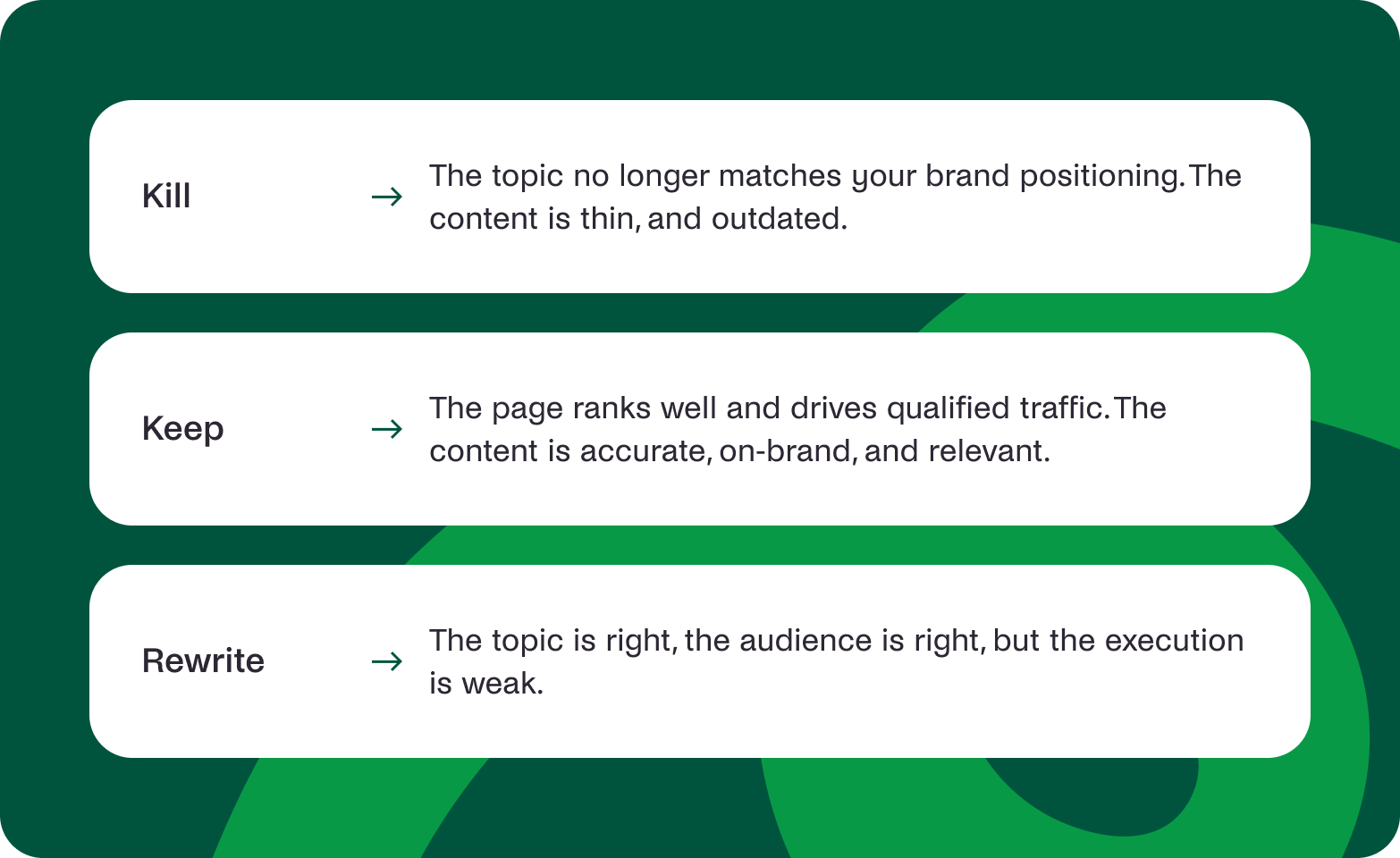
Here's the decision model:
Kill
Remove the page entirely (301 redirect to a relevant surviving page, or let it 404 if there's no logical destination). Kill is not a decision based on age alone — a three-year-old page that still converts is not a candidate.
- The topic no longer matches your brand positioning or product reality
- The content is thin, outdated beyond repair, or factually wrong
When both of those are true, the next question is effort:
- A full rewrite would take just as long as creating something new, and you'd rather create something new
- The page gets near-zero traffic and has no meaningful backlinks
Keep
Leave the page live, as is, or with minor touch-ups.
- The page ranks well and drives qualified traffic
- Content is accurate, on-brand, and still relevant to your audience
If both are true, the question becomes how much work it needs:
- Minor updates (refreshed stats, updated screenshots, a tighter intro) would take less than an hour
Rewrite
Overhaul the page while preserving its URL and any existing authority. Rewriting is not the same as adding a few new paragraphs to a stale post. It means restructuring the argument and refreshing the data.
- The topic is right, the audience is right, but the execution is weak
- The page targets a high-intent keyword you still care about
If the intent is strong, check whether the investment is worth it:
- A few hours of focused editing would bring it up to your current quality bar
- The page has backlinks or historical traffic worth preserving
The rule of thumb: if you can fix it in a few hours, rewrite. If it needs a ground-up overhaul and the topic no longer fits your brand, kill it. If it's already doing its job, keep it and move on.
What to review first (hint: not all 20,000 URLs)
When we ran our own audit, we did not start with a 20,000-row spreadsheet. That's the trap most teams fall into: Filters everywhere. Three weeks later, nothing's been done because the task felt like trying to weed an entire garden with tweezers.
Start smaller. Begin with your top 20 pages: the ones that drive the most organic traffic, the most conversions, or the most brand visibility. These are the pages doing the heavy lifting. If they're outdated, off-message, or targeting keywords you've since moved away from, fixing them delivers outsize returns compared with tidying up a forgotten post from 2019.
Here's what to check on each of those top pages:
- Does the content still match your current positioning and messaging?
- Is the information accurate and up to date (stats, product features, pricing, links)?
Then check intent and competitive fit:
- Does the page target a keyword you still want to rank for?
- Is the page cannibalising another page on the same topic?
Finally, look at the page through a visitor's eyes:
- Does the CTA still point somewhere useful, or does it lead to a dead end?
- Would a first-time visitor get a clear, correct picture of what you do?
Outdated pages confuse readers just as much as search engines. Google's systems try to understand what your site is about by looking at the whole picture. If your top pages send mixed signals (outdated claims here, old product names there), you're making it harder for the algorithm to trust your content.
Once your top 20 are clean, work outward. But don't skip watering the roots to chase the leaves.
Spotting cannibalisation: when your pages fight each other
Half the posts we deleted weren't bad in isolation. They were bad in combination. That's cannibalisation: five articles on "content strategy" published over three years, each slightly different, none clearly better than the others. Google sees all five, can't decide which one to rank, and ends up ranking none of them well.
A bloated blog is a sign of topical confusion. Multiple pages on the same intent split your relevance instead of concentrating it. Google has confirmed that crawl budget is finite, and wasting it on low-value or duplicate pages hurts the indexing of the pages you actually want discovered.
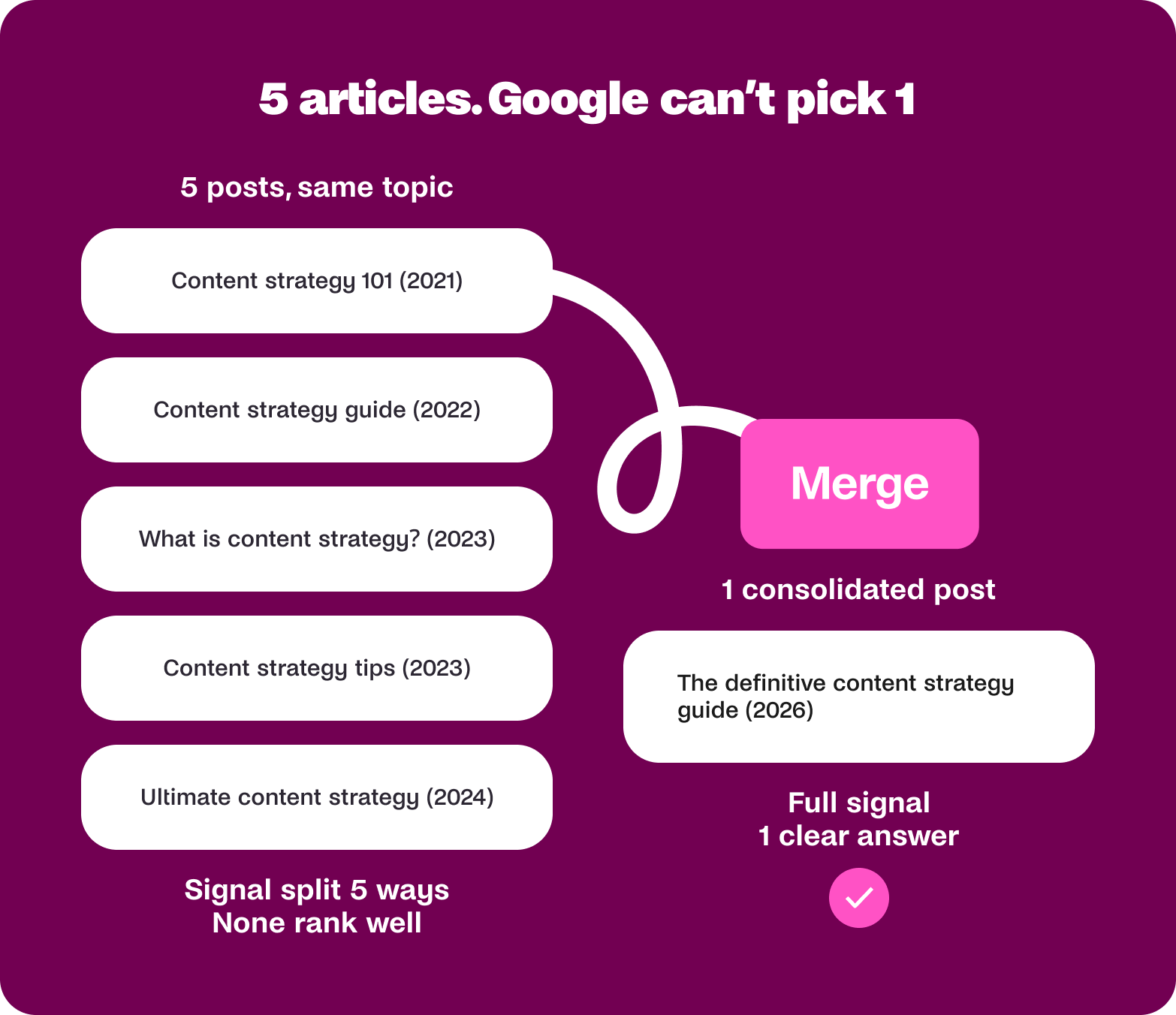
Watch for these cannibalisation warning signs:
- Two or more pages targeting the same primary keyword or search intent
- Rankings fluctuate between pages for the same query. Google keeps swapping which one it shows
Those are the easy ones to spot. Subtler signals include:
- A newer post ranks lower than an older, weaker one on the same topic, because both are splitting the signal
- Internal links point to multiple pages on the same subject, with no clear "main" page
The fix is usually consolidation. Pick the strongest page, merge the best content from the others into it, redirect the weaker URLs, and give Google one clear answer instead of five half-answers. Your content strategy sharpens, and your remaining pages grow stronger.
When a weak page deserves a rewrite, not a delete
Some of the posts we kept during our content audit were among the weakest performers at the time. But they covered topics our audience cared about, and they were written before we had a proper brand voice.
A page earns a rewrite when the fundamentals are sound, but the delivery isn't meeting your current bar. That might mean the writing is thin, the structure is hard to scan, the data is stale, or the page was written before your brand voice was properly defined.
Here are the signals that a page is worth rewriting rather than removing:
- The page targets a high-intent keyword your audience actively searches for
- The topic aligns with your current positioning and product offering
If the intent and topic are right, check whether the page has earned anything worth saving:
- The page has existing backlinks or a history of ranking (even if it's slipped)
Then weigh the effort:
- A focused rewrite with better structure, fresher data, and a tighter argument that could be done in a few hours
- The page addresses a real question your sales or customer success team hears regularly
If three or more of those signals are present, rewrite. If none are, delete. The kill/keep/rewrite framework from earlier applies here, but the decision should be based on effort versus return, not on how much you liked the original post.
If you're looking to repurpose strong content into new formats rather than starting from scratch, that's another way to get more from what you already have.
Make pruning a habit, not a one-off clear-out
We made one mistake after our initial purge: we treated it as a finished task. You audit once, delete a batch, feel virtuous, and then go right back to publishing at the same pace without looking back. Twelve months later, you're in the same position: a bloated blog dragging down your best work.

That's a hard sentence for content teams to hear, especially when quarterly targets are measured in volume. But fewer, better pages will outperform a sprawling archive of posts that nobody reads. High-quality content is still the main character, and not the number of URLs in your sitemap.
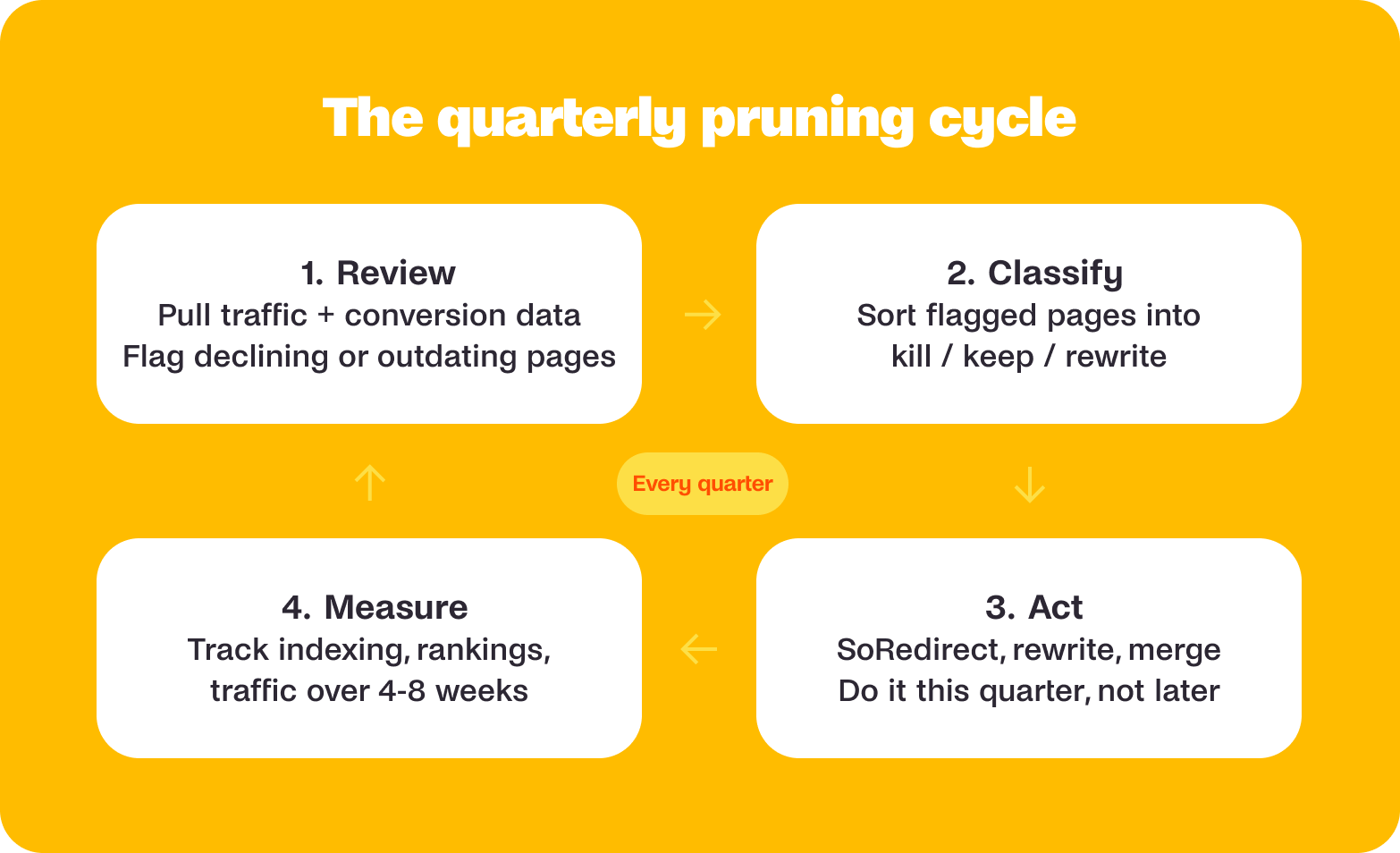
Pruning should be a quarterly habit, built into your content operations the same way you'd schedule a retrospective or a planning sprint. Here's a simple process:
- Review (quarterly): Pull performance data for all published content. Flag anything with declining traffic, no conversions, or outdated information. Cross-reference against your current keyword targets and positioning.
- Classify: Sort flagged pages into kill, keep, or rewrite using the framework above. Be honest about which bucket each page belongs in.
- Act: Execute the decisions within the same quarter. Redirect deleted pages. Brief rewrites. Merge cannibalising content. Don't let the audit sit in a spreadsheet.
- Measure: Track the impact over the following 4-8 weeks. Watch for changes in indexing, rankings, and traffic to your remaining pages. Use the data to refine your next round.
This cycle turns pruning from a crisis response into preventive maintenance. It also makes each round faster because you catch problems early rather than letting them compound.
The hardest part of pruning is not the analysis. It's the permission. Giving yourself permission to say: this page served its purpose, and now it's done. That shift from "we need more content" to "we need the right content" is what separates teams that grow from teams that just get louder.
Check whether your pages still reflect who you are, what you sell, and what your audience needs to hear. The posts that survive that test will perform better as a result. The ones that don't? Nobody will miss them (including you).
Want to hear it straight from the source? Watch the full episode of Permission to Rant, where Penny and Nike unpack why less content often means better performance.
FAQs
Should I delete old blog posts that aren't getting traffic?
Not necessarily. Before deleting a blog post, assess whether the topic is still relevant to your audience, whether the page has backlinks, and whether a rewrite could improve its performance. If a page no longer aligns with your business goals and has little traffic or authority, removing it may strengthen your overall content strategy.
Can deleting content improve SEO?
Yes. Removing low-quality, outdated, or redundant content can help search engines better understand your site's topical focus. Many businesses find that pruning underperforming pages improves the visibility of their strongest content by reducing keyword cannibalisation and improving overall site quality.
What is keyword cannibalisation?
Keyword cannibalisation occurs when multiple pages on your website target the same keyword or search intent. Instead of strengthening your rankings, these pages compete against each other, making it harder for search engines to determine which page should rank.
How often should I perform a content audit?
Most businesses benefit from conducting a content audit at least once per quarter. Regular audits help identify outdated information, declining traffic trends, duplicate content, and opportunities to refresh or consolidate existing pages before they become larger problems.
Should I refresh content or create new content?
If an existing page targets a valuable keyword, has backlinks, or previously performed well, updating it is often more effective than starting from scratch. Creating new content makes sense when you're targeting a completely new topic or audience need.
What should I look at first during a content audit?
Start with the pages that generate the most traffic, leads, or conversions. Reviewing your highest-impact content first typically produces faster results than auditing hundreds or thousands of low-traffic pages.
How do I know if a page should be merged with another page?
Pages should be considered for consolidation when they cover similar topics, target the same search intent, or compete for the same keywords. Combining overlapping content into a single authoritative resource often improves ranking potential and user experience.
Will I lose traffic if I delete pages?
Not always. If the deleted pages have little traffic, no meaningful backlinks, and overlap with stronger content, traffic may remain stable or even improve. The key is to redirect users and search engines to the most relevant remaining page whenever appropriate.
What are the signs that a blog has become bloated?
Common signs include multiple articles covering nearly identical topics, declining organic performance despite consistent publishing, outdated content, fluctuating rankings between similar pages, and difficulty establishing clear topical authority.
Is publishing more content the best way to recover from declining organic traffic?
Not necessarily. When traffic declines, the issue may be content quality, outdated information, or keyword cannibalisation rather than a lack of content. In many cases, improving, consolidating, or removing existing content produces better results than simply publishing more articles.


%20(1).webp)




.webp)